Tampa Bay · Practical shoot planning
Long-Term Rental Photography in Tampa Bay
Build a practical photography brief for a long-term rental: layout, storage, appliances, parking and accurate unit identification for Tampa Bay property managers.
- Identify the actual unit
- Show everyday functionality
- Verify the delivered set
Rental coverage worksheet
| Area | Information to capture | Manager verifies |
|---|---|---|
| Kitchen | Layout and actual equipment | What is included |
| Bedrooms and storage | Usable room views and storage context | Labels and any measurements |
| Laundry | Actual setup when included | Availability and terms |
| Parking/entry | Relationship to the building | Assignment and access |
| Common areas | Relevant shared facilities | Permission and accurate description |
Build the brief around practical questions
A prospective tenant needs to understand where they would cook, sleep, store belongings and move through the home. Start with clear room overviews and add functional details when they answer a question. Decorative close-ups are secondary to showing the available accommodation.
Ask the property manager which features are part of the current offer. Do not imply that portable appliances, furniture or accessories are included merely because they happen to be present at capture. The manager should verify the listing description against the actual rental arrangement.
Keep similar units distinguishable
If the booking covers more than one unit, give each one a clear identifier and a separate room list. Note differences in floor, layout, finishes or equipment before the shoot. Otherwise, similar kitchens can be confused when the files are reviewed or uploaded.
Label any model-unit material accurately in the publishing workflow. Do not substitute a different unit’s renovated bathroom without explanation. The photograph should support the property being offered, not simply represent the most attractive space available in the building.
Show storage and utility features in context
Discuss closets, laundry and utility spaces that matter to the rental brief. A photograph should make the feature understandable, not merely show a closed door. Decide with the photographer whether a contextual room view or a separate detail is needed.
Avoid inventing capacity or dimensions from an image. If the manager advertises storage sizes, appliance specifications or another measurable feature, verify those details separately. Photography records a view; it does not replace an inventory or condition report.
Document the kitchen as it is supplied
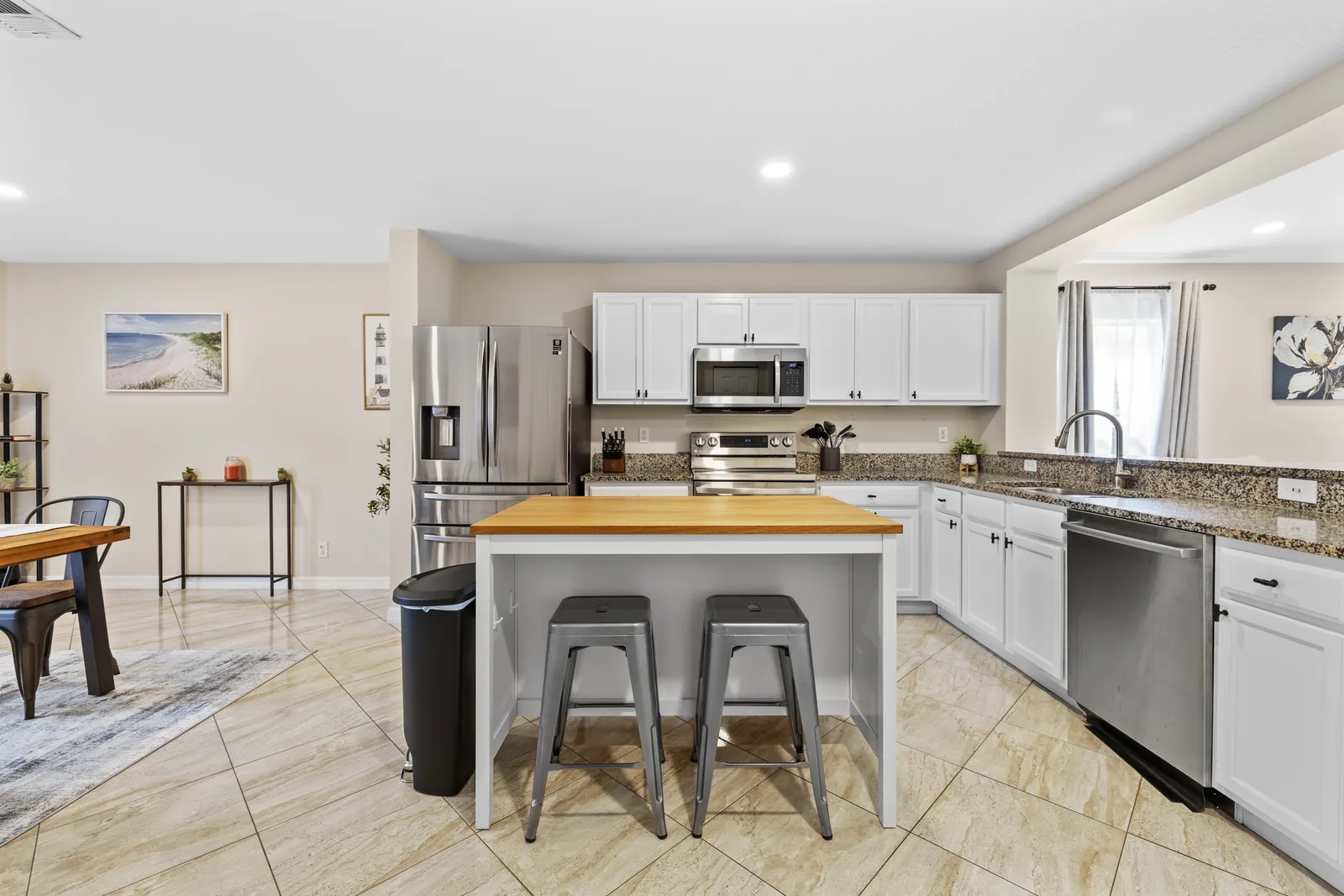
A useful kitchen overview shows the work area, cabinetry and visible appliances together. Additional photographs may be warranted for a relevant feature that is not clear in the overview. Prepare surfaces so the equipment is visible, while keeping the presentation consistent with what will be provided.
The Clearwater photograph below illustrates kitchen coverage only. It is from a K94 townhome shoot and is not evidence that the property was marketed as a long-term rental. For your brief, the manager should identify which actual fixtures and equipment need to be documented.
Explain arrival, parking and shared areas accurately
List the exterior and common-area images that are useful to the prospective tenant. A building entrance can help explain arrival; a wider view may show how parking relates to the building. A photograph alone does not establish that a particular space is assigned to the unit.
Have the manager verify access and amenity descriptions. Arrange permission before photographing common areas, and keep residents outside the planned compositions. Do not infer lease terms or exclusive access from what happens to be visible during the visit.
Coordinate the turnover window
Book around actual cleaning and maintenance readiness, not merely the scheduled end of a tenancy. Ask the local contact to confirm that the required spaces are accessible and completed. If work remains, decide whether to postpone or explicitly limit the coverage.
If an occupied unit must be photographed, have the property manager arrange access with the occupants and clarify how belongings will be handled. The photographer should not be expected to resolve tenancy or entry arrangements at the door.
Approve and maintain the gallery by unit
Review each delivered folder against its unit identifier and feature list. Check for mix-ups before posting. When equipment or finishes change, replace the affected photographs and inspect connected views for the old condition.
Send K94 the number of units, the differences between them, required amenities and the intended use. A multi-unit rental assignment may require a different scope from a single-home listing package, so confirm the quote and delivery structure before booking.
A brief you can adapt
Property and unit identifiers: [ ]. Layout differences: [ ]. Appliances and features to show: [ ]. Shared areas: [ ]. Turnover readiness date: [ ]. Access coordinator: [ ]. Intended use and delivery folders required: [ ].
Download the editable text templateFrequently asked questions
Can I use one unit’s photographs for every apartment?
Do not assume they represent all units. Identify differences and make the publishing descriptions accurate. Discuss unit-specific coverage where needed.
Is this the same brief as an Airbnb shoot?
Not necessarily. A long-term rental brief focuses on the supplied home and everyday functionality; a vacation-rental brief may need additional guest-use and sleeping-configuration details.
Plan your property shoot
Discuss a Tampa rental-property shoot. Send the address, requested coverage and deadline so we can confirm the scope and availability.